
MTG card scanner & collection tracker
The MTG card scanner that gets the printing right.
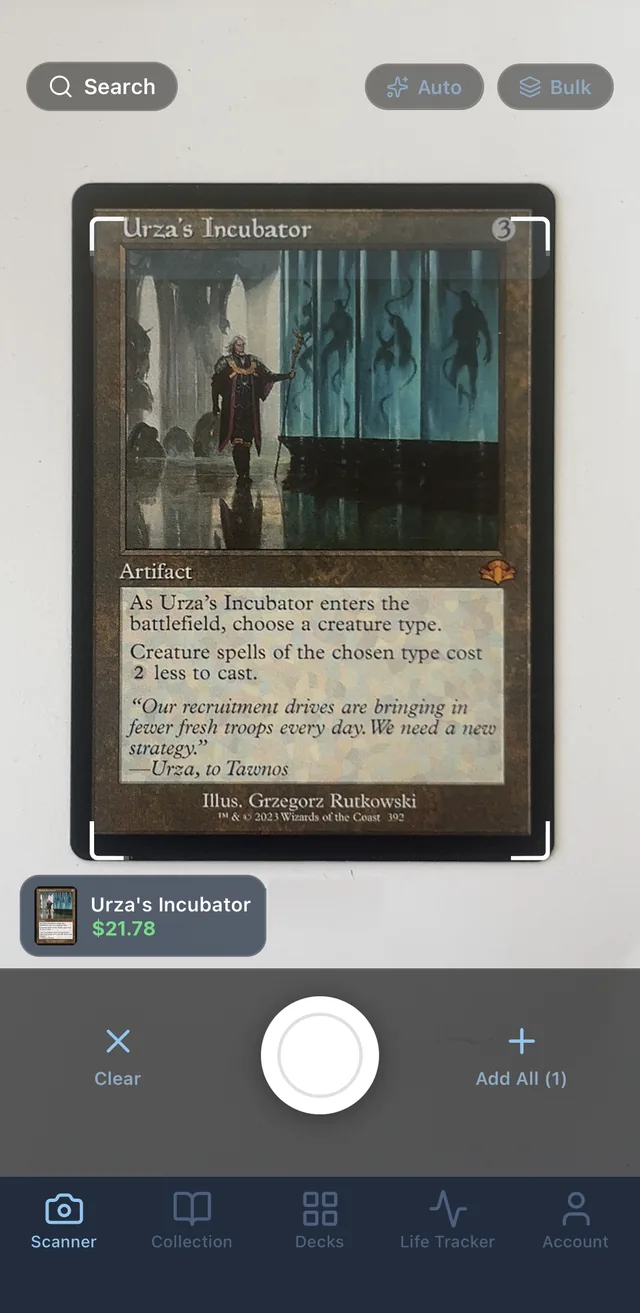
Point your phone at a Magic: The Gathering card and CardWisp reads the name, set code, and collector number, then pulls in the exact printing and its current price. Every scan waits in a review tray, so nothing lands in your collection by mistake.
Free on iPhone and Android. 25 scans a day on the free tier.
How scanning works
Scanning a Magic card with CardWisp takes about as long as reading its name out loud. Here is what happens behind the shutter.
- Point and shoot. Hold the card in the frame. CardWisp reads the title, set code, and collector number right on your phone, then looks the card up on Scryfall.
- Check the review tray. The card appears in a tray at the bottom of the scanner with its price. Tap it to switch foil on or off, pick a different printing, swap a wrong match, or remove it.
- Add All. When the tray looks right, one tap adds every card to your collection. Nothing is added until you say so.
Built for big stacks, not just single cards
Exact printing
Reads the collector number and set code, so a Sol Ring from Commander Masters is not confused with one from a precon.
Hands-free bulk scanning
Press play and feed cards through one after another. A strip of recent scans shows what was caught.
Foil aware
Mark foils in the tray and see foil prices tracked separately from non-foil copies.
Fast, on-device reading
Text recognition runs on your phone, so scans come back quickly, even with a weak signal.
Search when you need it
Odd frames, proxies, or a split card that will not read? Tap Search and add it by name in a couple of taps.
Live prices
Every card comes in with its current price, and your collection keeps a running estimated value.
MTG collection tracker
Your whole collection, priced and organized
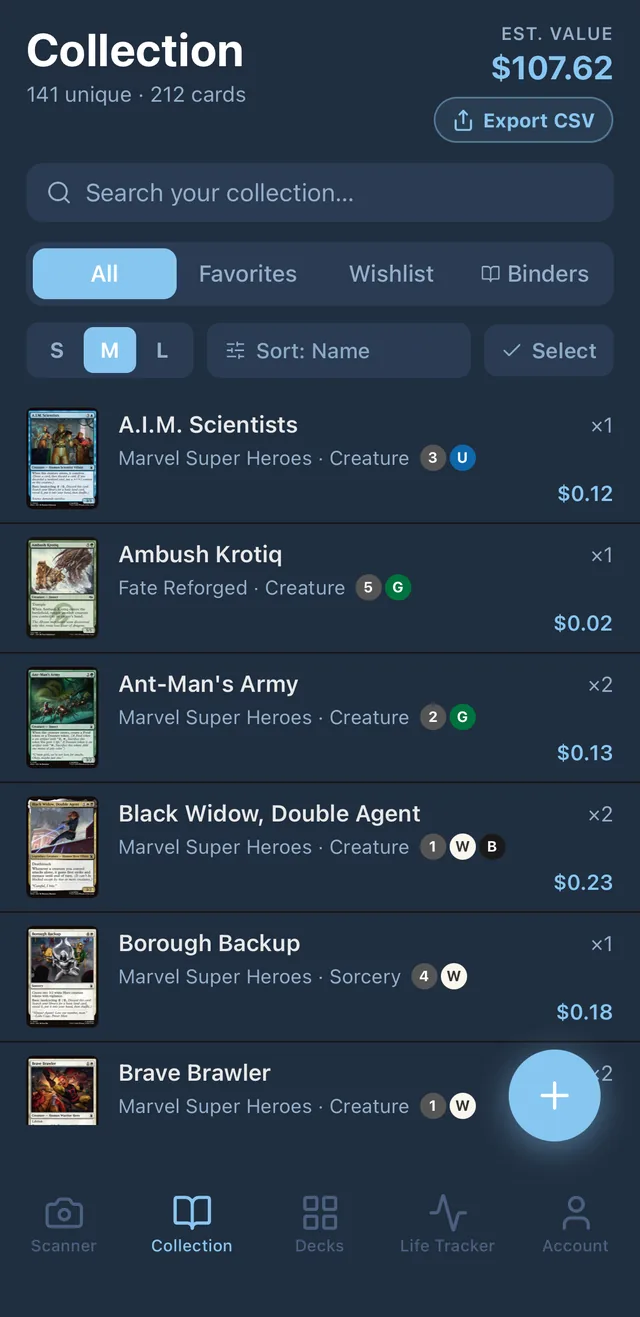
Scanned cards go straight into a collection you can actually use. See how many unique cards you own, how many copies in total, and what it is all worth.
- Binders for sets, trade binders, decks in progress, or however you sort. Pick a binder in the review tray and scans go straight into it.
- Favorites and a wishlist for the cards you love and the ones you are hunting.
- Search and sort by name, set, color, or value.
- Bulk cleanup with multi-select and swipe to delete.
- Free CSV export of your whole collection or a single binder, in a format Moxfield, ManaBox, and Deckbox can import.
- Sync across devices when you sign in with the same Apple or Google account.
Tips for a clean scan
- Even light beats bright light. A lamp off to the side works better than one straight overhead.
- Tilt foils a little. Angling the card away from the light keeps glare off the collector number.
- Fill the frame. Keep the whole card inside the corners, including the bottom text strip.
- Adventure and split cards sometimes read oddly. If one misses, use Search at the top of the scanner.
- Proxies use non-standard fonts and frames. Add them with Search and mark them as proxies in the card details.
Free and Pro
Everything about the scanner works on the free tier. Pro is for collectors who scan a lot.
| Free | Pro | |
|---|---|---|
| Card scans | 25 per day | Unlimited |
| Collection size | 500 unique cards | Unlimited |
| Review tray, bulk scanning, binders, prices, CSV export | Included | Included |
Card scanner FAQ
Is the CardWisp card scanner free?
Yes. The free tier includes 25 card scans per day and a collection of up to 500 unique cards. CardWisp Pro removes both limits.
Can it tell different printings of the same card apart?
Yes. Along with the card name, the scanner reads the set code and collector number from the bottom of the card and uses them to find the exact printing. If the bottom strip is unreadable, it matches by name and you can pick the right printing in the review tray before adding.
Does the scanner work on foil cards?
Yes. Glare can wash out the small text on foils, so tilt the card slightly away from your light. You can set foil or non-foil on each card in the review tray, and foils are priced separately in your collection.
Does CardWisp work on Android?
Yes. CardWisp is available on Android through Google Play and on iPhone through the App Store, and your collection syncs between devices when you sign in with the same account.
Where do card prices come from?
Card data and prices come from Scryfall, the card database most Magic players already use. Your collection's estimated value updates from the same source.
Can I scan a whole stack of cards at once?
Yes. Turn on hands-free scanning and feed cards in front of the camera one after another. Each card lands in the review tray, and you add them all with one tap when you are done.
More in CardWisp
Scan your first stack tonight.
Free on iPhone and Android. Your collection syncs between both.